If your Google Business Profile verification keeps getting rejected, there's a good chance you've already read some version of "check if your address matches across Yelp, Facebook, and other directories." It's common advice. It's also usually not what's actually failing you.
The Explanation You'll Usually Hear Isn't the Real Problem
A lot of advice about failed verification points at inconsistent business information across the web. Your Google Business Profile says one thing, Yelp says something slightly different, Facebook still shows an old location, and the story goes that Google gets "confused" by the mismatch and won't verify you.
In practice, this usually isn't what's happening. Plenty of legitimate, easily verified businesses have a stale or slightly wrong address sitting on a Yelp listing they lost the login to years ago, or a directory they never claimed in the first place. Google's verification process isn't cross checking every listing on the internet before deciding whether to approve you. Keeping your name, address, and phone number consistent everywhere is genuinely good practice for local SEO, and it's something worth cleaning up regardless, but it's rarely the specific thing standing between you and a passed verification.
What Actually Fails Verification, Almost Every Time
After managing Google Business Profile verification directly for a lot of businesses, the real pattern is consistent. Verification fails when the video itself doesn't clearly and quickly prove the business is physically located at the exact address typed into the profile.
It's worth being upfront that nobody outside Google knows for certain whether a person watches these videos, an automated system screens them, or some mix of both. What's clear from the pattern of outcomes is that whatever does the reviewing is working from a short clip and making a fast call. If the connection between what's on screen and what's written in the address field isn't obvious almost immediately, the video gets rejected, no matter how clean your citations are everywhere else on the internet.
What a Verification Video Actually Has to Prove
A video that passes has to establish three things clearly.
The business is genuinely located at the address shown on the profile. The business matches the category that was selected when the profile was set up. And the person filming is actually authorized to manage the business, not just someone walking past.
Everything about how you film should be built around proving these three things as fast and as clearly as possible. Google's own official guide to covers the available methods at a high level, though it's light on the specific, practical detail that actually determines whether a video passes or fails, which is what the rest of this guide focuses on.
How to Film a Verification Video That Actually Passes
Start with the street sign. This is the single most important shot in the entire video. If your Google Business Profile address says "510 Peacock St," the first thing the video should show is the actual street sign for Peacock. It's the fastest, most objective way to anchor your location to the exact address on file, before showing anything else.
Move efficiently. Google's video verification has a length and file size limit, so wandering around or walking slowly costs you time you don't have. If the street sign isn't right outside your door, get to it quickly. Walk briskly, grab a bike or a scooter if that's genuinely faster, whatever gets you there without burning through your limited recording window.
Show the exact address number on the building, the door, or the suite if it's visible. This is the second most direct confirmation after the street sign itself.
Pan to a recognizable nearby business or landmark, if one exists. This gives whoever or whatever is checking the video something to cross reference against a quick map search.
If there's genuinely nothing recognizable nearby, show the general surroundings. Other buildings, the block, nearby structures. The goal is making it read as a real, specific place, not an empty lot or an ambiguous stretch of road.
Keep it one continuous, unedited take. Cuts, edits, and re-uploads are one of the most common reasons a video gets flagged, since Google is specifically looking for an unbroken recording.
Show permanent signage, not something that looks temporary. This is one of the most common reasons a storefront video gets rejected even when everything else was done right. A paper sign taped to the door or a printed sheet in the window reads as temporary during review, even if you genuinely intend to keep it there. What actually satisfies Google is signage that looks built to last, and a vinyl sign is usually the fastest, most affordable way to get there if you don't already have one. If there's a local sign or print shop near you, ask specifically for vinyl rather than a paper or foam board option.
Show your business name matching exactly, on a business card, your license, or a branded vehicle. Whatever name you show has to match what's actually entered on your profile, which is another reason a vinyl sign with your correct, current business name does double duty here. Google's own guidelines for representing a business are specific about this, your listed name has to reflect your real world business name, not a keyword stuffed version of it.
If your office or storefront has a locked door, show the lock itself. This is a step a lot of people skip, and it's a common reason verification fails even when the address and signage are both right. Show the door closed, push on it without a key so it's clear the door is actually locked and doesn't budge, then unlock it with your key slowly and deliberately. Don't rush this part. It's the specific moment in the video that proves you have real, authorized access to the location, rather than just standing outside it.
The same core standard applies to service area businesses, with different proof. You don't need permanent signage or a locked door, since there's no storefront to show. Instead, show your branded vehicle with your logo and business name clearly visible, your tools or equipment, or your booking system in use. Proof of your business's website and domain, showing you control the backend, can also help establish that you're genuinely running the business. Showing a locked vehicle being unlocked isn't required here the way a storefront door is, but it does strengthen the video if you include it.
Read the Rejection Email Carefully, It Tells You Exactly What to Fix
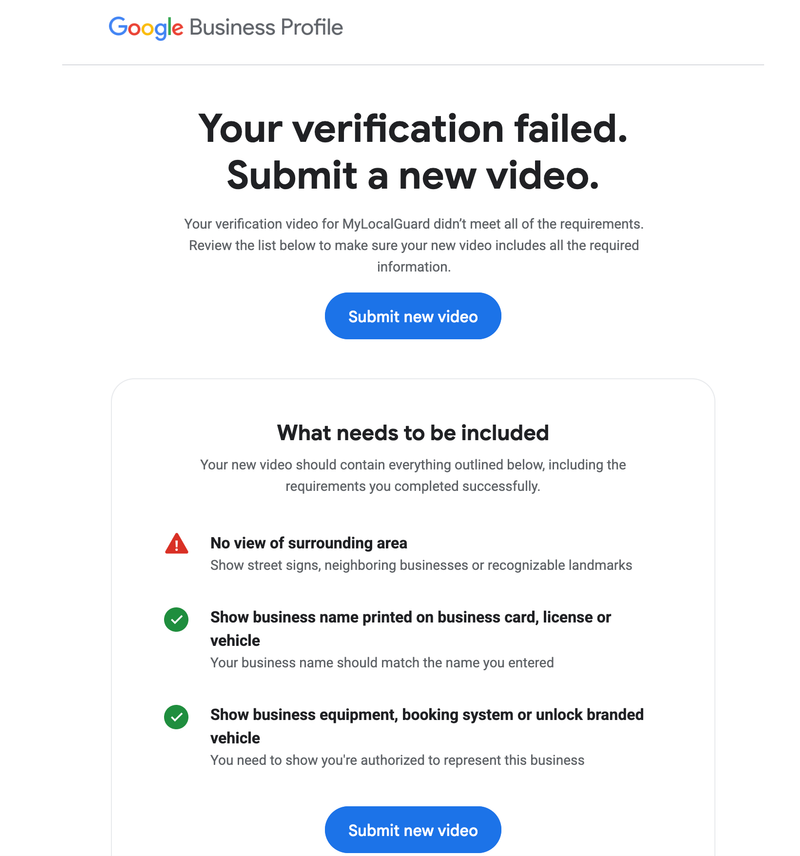
If a submitted video gets rejected, Google doesn't leave you guessing. You'll get an email, sent to the address tied to your verification, with a subject line along the lines of "Action required, submit a new verification video." Open it. It's more useful than most people realize.
The email breaks down what your next video needs to include, and it marks which requirements your last attempt already met successfully, so you're not starting from zero. In practice, the feedback tends to fall into the same three buckets every time.
- A note that the surrounding area wasn't clearly shown, meaning you need street signs, neighboring businesses, or a recognizable landmark in the frame, not just a close up of your own door.
- A note about your business name, meaning it needs to be visibly printed somewhere, on a sign, a business card, a license, or a vehicle, and it has to match what's actually entered on your profile.
- A note about proving you're authorized to represent the business, meaning equipment, a booking system in use, or unlocking a branded vehicle or door, something that goes beyond just being physically present.
Whichever of these your email flags is the specific thing to fix before you film again. Resubmitting the same footage with the same gaps just produces the same rejection.
Your Address Still Has to Match Exactly, Just Not for the Reason You Think
Even though a mismatched Yelp listing usually isn't the direct cause of a failed verification, precision still matters enormously, just in a different place than most advice points to. The address typed into your Google Business Profile has to match, character for character, what you show and say in the video.
A wrong suite number, a misspelled street name, or an abbreviation that doesn't match what's actually printed on the street sign is a real, common reason verification fails. That's because the profile's address field is the literal thing your video gets compared against during review, not some average of what's written across the internet.
What to Do If You've Already Failed More Than Once
Resist the urge to simply resubmit the same video with nothing changed, or to keep explaining your situation in writing instead of fixing the footage. Go back through the three proof points above and read your rejection email carefully to see exactly which one your last attempt didn't nail.
Nine times out of ten, it's the location proof specifically, the street sign and the exact address match, that needs to be faster and clearer in the next attempt, not a deeper issue with your business itself.
What Happens After Two or Three Failed Attempts
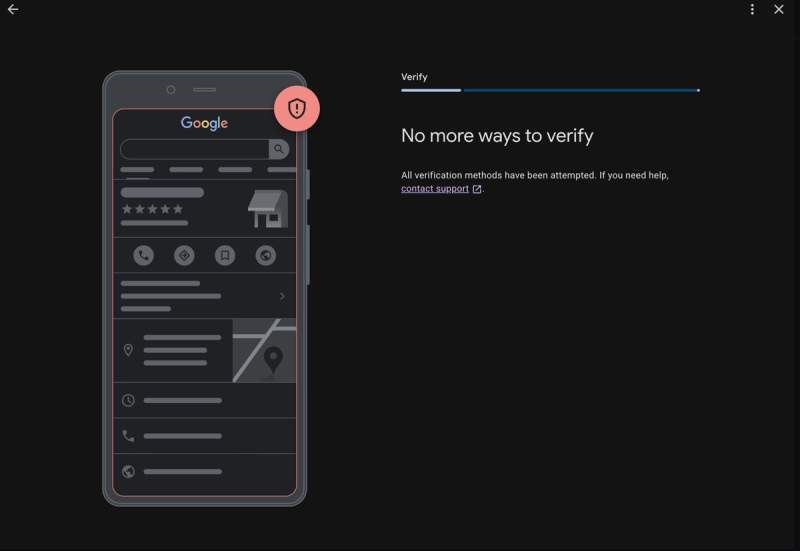
This is the part that catches people off guard. Fail enough times, and instead of being offered another video attempt, your profile may simply show a message saying there are no more ways to verify this business. It can happen after as few as two failed attempts, sometimes it takes three, and it understandably feels like a dead end.
It isn't one, but the path forward changes. At this point you need to contact Google support directly and ask them to re-enable verification. What you shouldn't expect is for them to simply reopen the same recorded video option you tried before. Once you've hit this wall, the method Google typically re-enables instead is live video verification, a real-time call where you walk an actual Google representative through your location yourself, rather than uploading a pre-recorded clip for someone to review later.
Practically, this means you're not just preparing footage anymore, you're preparing for a live conversation. Make sure you have Google Meet installed on the phone you'll be using, since that's what the call runs through, and treat it the same way you'd prepare for the recorded version. Know your route, know exactly what you'll show and in what order, and be ready to answer questions directly from the representative in the moment, not just narrate a walkthrough.
If you've been through several failed attempts and aren't sure what's actually going wrong, our Google Business Profile Verification Service covers exactly this, including service area business cases where the standard advice doesn't quite apply. And if your profile has already been suspended rather than just stuck on verification, that's a related but different process covered by our GBP Reinstatement Service