





Done For You Service

Google Business Profile Verification Service

Still known to a lot of business owners as "GMB verification," this is where every Google Business Profile actually starts. An unverified listing can't fully appear on Maps or Search, and a botched verification attempt can create problems that follow the profile for months. We handle video and live video verification, phone and postcard where Google still offers them, and service area business verification, including cases where verification was revoked after passing.

Get verifiedBuild trustStand out in local search
Get Your Free Verification AssessmentProfile suspended instead?
5.05.0
Free verification assessment, same dayAll verification methods coveredService area business specialistsUSA, Canada, Australia, and Europe
Our Clients

Trusted by Local Businesses Across the USA, Europe, and Australia

Verification is the gate every Google Business Profile has to pass before it can fully appear on Google Maps and Search. For a lot of real businesses, it's also where everything gets stuck. The video gets rejected with a vague email. The second attempt fails too. Then the dreaded message appears: no more ways to verify.

We've helped many business owners through this. Over seven years working inside digital marketing agencies in the USA, we handled more than 1,000 Google Business Profiles, and verification problems were part of our everyday work. We know exactly what the reviewers look for, and we prepare you so you get it right.
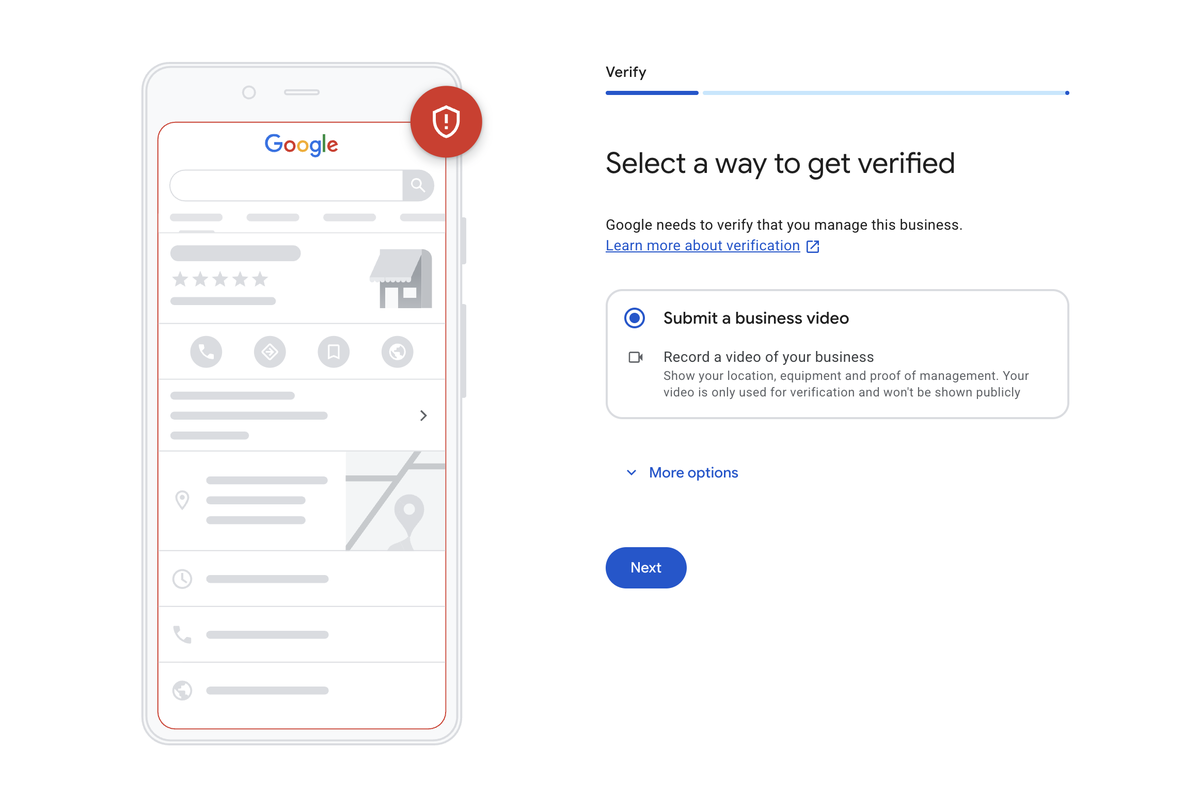
Screenshot of the Google Business Profile verification screen titled Select a way to get verified, with Submit a business video selected as the verification method
The real verification screen inside Google Business Profile. For most businesses today, a business video is the main option offered.

The Verification Methods Google Offers Today

Google decides which methods you see based on your category, your location, and your account history. These are the ones we see most:

  • Video verification. You record a short, continuous video on your phone and upload it. This is the most common method by far, and for home service businesses like plumbers, HVAC, electricians, roofers, and cleaners, it's usually the first and often the only option. These categories are heavily targeted by fake listings, so Google wants to see proof.
  • Phone or text verification. A code sent by call or SMS.
  • Email verification. A code sent to an email address.
  • Live video call. This only appears after you've run out of attempts, usually after 2 or 3 failed verifications, when Google shows "no more ways to verify". To unlock it, you need to contact Google support, and it can take 2 to 7 business days to become available, sometimes 14 or more.
  • Postcard. Much rarer than it used to be.

For businesses people have to visit in person, like restaurants, gyms, hotels, and salons, Google sometimes offers email or SMS verification, because those categories are harder to fake.

A warning about the easy options

When email, phone, or instant verification appears, many owners take it happily, because it's easy. In our experience, those profiles are much more likely to be suspended a few months later, even when the business is real. Easy verification is weak proof in Google's eyes. If video is offered, choose video. It takes more preparation, but it gives your profile a far stronger foundation. (If you're already suspended, see our reinstatement service.)

Exactly What Your Verification Video Must Show

The video must be one continuous recording, no cuts and no edits. Here's the checklist we teach every client.

If you have a storefront or office (your address is shown)

  1. Start outside at the street sign so the reviewer can see your street name.
  2. Show the neighbouring businesses on your street, to prove the location.
  3. Show your building, suite, or door number.
  4. Show your permanent signage with your exact business name. It must be permanent, not a printed sheet of paper or a temporary sticker.
  5. Show the door is locked, then unlock it with your key. Push the door first so the reviewer sees it's locked. This proves you have access.
  6. Go inside and show your workspace: your signage (if it's inside), your desk, your equipment, your products, anything that proves you serve customers there.

If you're a service area business (no address shown)

Service area businesses are usually easier to verify, because the requirements are less strict. Show:

  1. The street sign where you are, and nearby businesses.
  2. Your tools, equipment, or branded vehicle.
  3. Instead of permanent signage, show proof that you control the business: logging in to your website's domain or hosting, your website admin, your Facebook business manager, your CRM, or anything else that digitally or physically proves you have access to restricted business systems.

How We Prepare You (So You Don't Waste an Attempt)

Verification attempts are limited, so we never send you in unprepared.

  1. We check your profile first. Name, address, category, and service areas must be right before you record anything.
  2. We talk you through it on a call, and sometimes by message too, before you attempt. We don't stay on the phone while you record, because you need to focus on the video, not on a conversation.
  3. We test you. After teaching you the steps, we ask you to tell us exactly what you'll do, in order. We only send you to record when we're confident you've got it.
  4. If it still fails, Google's rejection email usually explains what was missing. We read it, correct the issue, and prepare you for the next attempt.

Verified, Then Suspended?

Sometimes a profile is verified and then suspended soon after. Sometimes Google simply flags a legitimate business by mistake. When that happens, we treat it like a reinstatement: we check every detail on the profile, and if everything is correct, we appeal with documents, storefront photos, and a video walkthrough of the office.

Before We Take Your Case

Our first question is always the same: do you really have an office at the address on your profile? If you don't, verification at that address won't pass, however good the video is. The right setup is usually a service area business instead. We'll tell you honestly before you spend anything.
Why Business Owners Trust MyLocalGuard

All Verification Methods Covered
Video, phone, email, or a live video call once attempts run out. We know how each method works, which one your category is likely to get, and which one gives your business the strongest, longest lasting verification.
Service Area Business Specialists
SAB verification works differently than a standard storefront listing, and most guidance online doesn't address it. We've built specific strategies for businesses without a public facing address, including proving access to your domain, website, or CRM.
Compliance-First Approach
We fix verification the right way, making sure your profile fully aligns with Google's guidelines so it stays verified long-term instead of getting flagged or revoked later.
Built to Rank After Verification
Getting verified is the start, not the finish line. We make sure a newly verified profile is set up to actually rank, generate calls, and drive leads through our ongoing local SEO work.

How We Work

1
Free Verification Assessment
Same Day

We review your profile setup, business category, verification history, and current status to identify exactly what's blocking verification and the fastest path forward.

2
Custom Verification Strategy
24 to 48 Hours

We fix your profile first, then map out the right method for your business: video, phone, email, or requesting a live video call from Google support when attempts have run out.

3
Guided Implementation & Follow Up
3 to 7 Days

We teach you the exact video checklist, test you before you record so you don't waste a limited attempt, and if it fails, we read Google's reason and prepare the next attempt.

Common Reasons Verification Fails

Most failed verifications come down to a few small things the reviewer needed to see and didn't. Storefront businesses fail far more often than service area businesses, because the storefront requirements are much stricter. These are the reasons we see most.

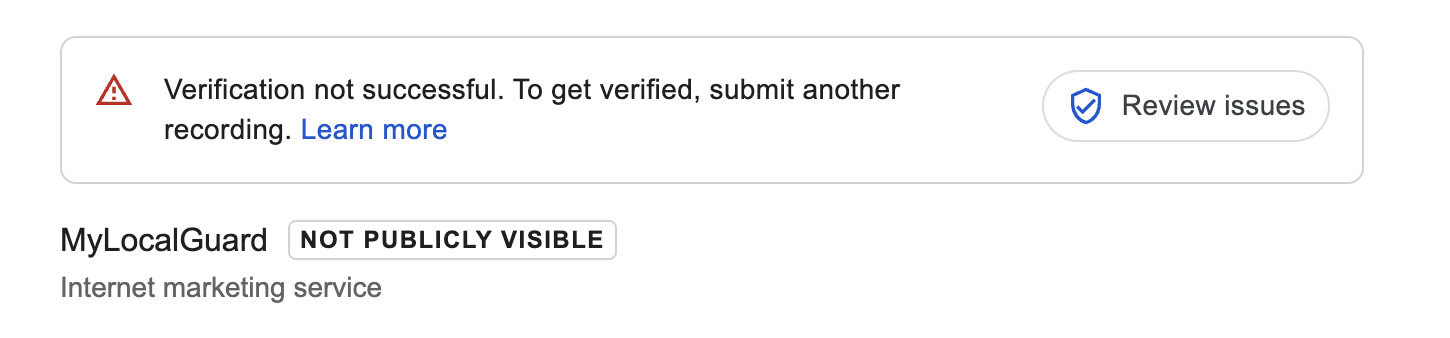
Screenshot of a Google Business Profile notice reading Verification not successful, to get verified submit another recording, with a Review issues button and the profile marked Not publicly visible
A real failed video verification notice, shown on our own profile as a demonstration. Clicking Review issues shows exactly what the recording was missing.
Signage Isn't Permanent
A printed sheet of paper or a sticker that looks temporary gets rejected. Your signage must be permanent and show your exact business name.
No Street Sign Shown
The reviewer needs to see where you are. Start the video at the street sign and show neighbouring businesses before you reach your door.
Door Not Shown Locked, No Key Used
Walking straight in through an open door is a common reason for rejection. Show the door is locked first, then unlock it with your key.
Name Doesn't Match the Profile
If the name on your signage isn't exactly the same as the name on your Google Business Profile, the attempt can fail.
No Proof of Access for Service Area Businesses
Without a storefront, you need to show you control the business: log in to your website domain, website admin, Facebook business manager, or CRM on camera.
No More Ways to Verify
After 2 or 3 failed attempts, Google shows no more ways to verify. A live video call can then be requested through Google support, which can take 2 to 7 business days or longer.

Service Options

Free Verification Assessment
$0
No commitment required
✓Verification history review
✓Business category and profile check
✓Root-cause diagnosis
✓Recommended verification path
✓No obligation to continue
Request Free Assessment
Verification Fix
Custom quote
For businesses that just need to get verified
✓Full verification audit
✓Custom verification strategy
✓Video verification guidance
✓Google liaison & follow-up
✓Profile health check
Get Started

Everything You Need to Know

Find answers to the questions we hear most about Google Business Profile verification.

The most common is video verification, where you record and upload a short continuous video. Some businesses also see phone, text, or email verification, especially restaurants, gyms, hotels, and salons. Home service businesses are usually only offered video. A live video call only becomes available after you've run out of attempts and contacted Google support. Postcards are much less common now.

Postcards are much less common now. If yours keeps failing, request another method. Most businesses today are offered video verification, which is faster and more reliable when done correctly.

You record one continuous video on your phone and upload it to Google. For a storefront, start at the street sign, show neighbouring businesses, your door number, your permanent signage, the locked door being unlocked with a key, and your workspace inside. For a service area business, show the street, nearby businesses, your tools or vehicle, and proof that you control the business, like logging in to your website domain or CRM.

It's a live verification with a Google representative. It only appears after you've used up your attempts, usually after 2 or 3 failures, and you see no more ways to verify. You then contact Google support to request it, which can take 2 to 7 business days, sometimes 14 or more.

In our experience, profiles verified by email, phone, or instantly are more likely to be suspended a few months later, even when the business is real. If video verification is offered, we recommend choosing it.

A revoked verification almost always points to a compliance issue discovered after the fact, not a mistake in the original verification itself, a name, address, or category change that no longer matches what was verified, a duplicate listing conflict, or account activity that triggered Google's fraud and spam detection systems. We identify the specific trigger and fix the underlying issue before attempting to restore verification, since resubmitting without addressing the cause typically leads to the same result. Sometimes Google flags a real business by mistake. We check every detail, then appeal with documents, storefront photos, and a video walkthrough.

Yes, and it's usually easier. Instead of permanent signage, you show proof that you control the business, like logging in to your website domain, your website admin, your Facebook business manager, or your CRM, along with the street, nearby businesses, and your tools or vehicle.

A video is usually reviewed within a few days. If you've run out of attempts, unlocking a live video call through Google support can take 2 to 7 business days, sometimes longer.

Seven years of hands on experience inside US marketing agencies and more than 1,000 profiles handled. We screen your case honestly, fix your profile first, teach you the exact video checklist, and test you before you record, so you don't waste a limited attempt.

The most common reasons are temporary signage, not showing the street sign, not showing the door locked before using a key, a business name on the signage that doesn't match the profile, and, for service area businesses, no proof of access to business systems like your domain or CRM.

Get Started

Request your free verification assessment

Tell us where you're stuck, postcard, video, revoked, or new listing, and we'll take it from there.

We review every submission within 1 business day.

Let's get your profile verified, and keep it that way

Start with a free assessment. We'll tell you exactly what's blocking verification and what to do about it.

Request Your Free Assessment

Profile suspended instead? Google Business Profile Reinstatement Service